So, you’ve shipped that shiny new AI feature using the Laravel 13 AI SDK and everything feels great—until the first billing cycle hits. You realize your users have been running recursive agentic loops on your dime, and suddenly that "pay-as-you-go" model feels more like a high-interest loan. Traditional request-based throttling doesn't cut it when one user prompt triggers ten expensive sub-calls to GPT-4o. Effective LLM cost management Laravel implementations require us to move past "hits per minute" and start thinking in "cents per session." If your middleware isn't counting tokens, you’re essentially handing out blank checks to every API consumer and hoping for the best.
The real headache starts when you move beyond simple chat completions and into the realm of streaming responses. How do you track usage when you’re piping chunks back to the frontend in real-time? Or even worse, what happens when an autonomous agent gets stuck in a logic loop, burning through your budget while your team is offline? Standard Laravel rate limiters are built for web traffic; they don't understand that one request might cost a fraction of a cent while another costs three dollars. We need a architectural way to intercept these calls, capturing metadata before the bill becomes a nightmare.
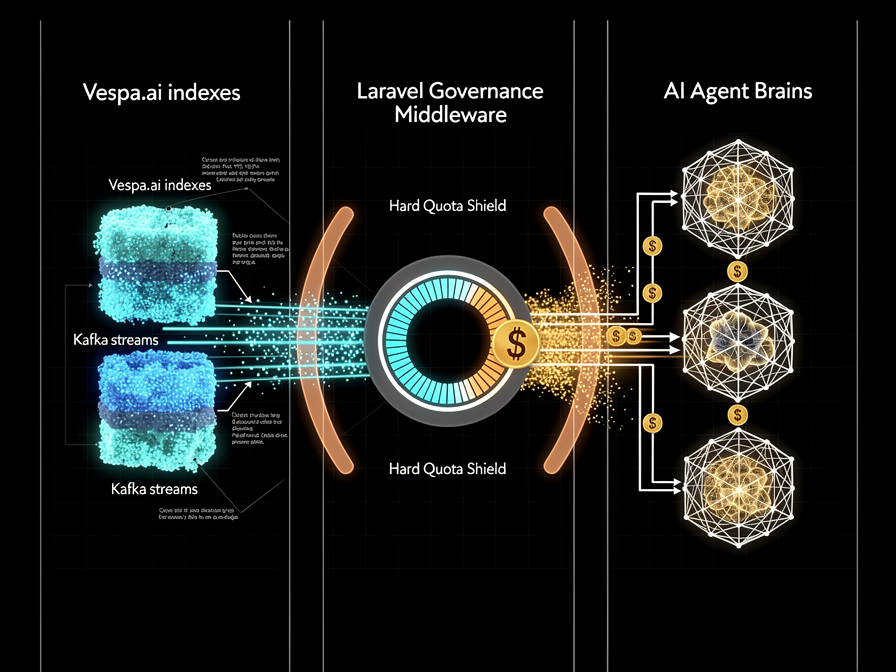
This article breaks down how to build a governance layer that treats LLM tokens like a finite currency. By leveraging the AI SDK’s middleware and moving the heavy lifting to background jobs via Redis, we can implement a "Budget Pool" pattern for multi-tenant environments. This isn't just about slamming the door on a user; it’s about creating a granular kill switch that distinguishes between a power user and a runaway bot. We'll look at how to hook into the stream and keep the finance team happy without compromising the snappy response times your users expect.
The High Cost of 'Hello World': Why Standard Rate Limiting Fails
Most of us started our Laravel journey by slapping RateLimiter::for('api', ...) into a service provider and calling it a day. For a standard REST API, that’s fine. A request is a request. But when you’re bridging your application to an LLM, you aren't just managing traffic; you're managing a variable-rate debt. If you’re still using default throttling for AI features, you’re essentially trying to measure a firehose with a ruler.
Requests vs. Tokens: The unit of account
Standard middleware treats every hit as a single unit. It’s like charging the same price for a glass of water as you do for an Olympic-sized swimming pool. With models like GPT-4o or Claude 3.5, a 20-token "Hello" is a rounding error. A 100k token context window injection? That’s a line item your CFO will definitely notice. If we don’t track the weight of the request—the tokens consumed—we’re flying blind. We need a way to stop counting hits and start counting the actual currency of the AI economy.
// This tells us nothing about our actual burn rate
RateLimiter::perMinute(60)->by($request->user()->id);

// What we actually need is a "Value-at-Risk" check
if (TokenBucket::isExhausted($user, $estimatedTokens)) {
    throw new BudgetExceededException();
}
The hidden price of agentic loops
Things get even wilder once you introduce agents or multi-step workflows. If you’ve implemented a Pipeline pattern to handle "Research -> Summarize -> Translate," a single user click could trigger a chain reaction of five separate API calls. If that research step hits a loop because the model is hallucinating a search result, your cost per interaction doesn't just climb—it teleports. We need a governance model that understands these sequences. Instead of asking if a user has clicked too much, we must ask if the current session can afford the potential burn of the next automated step.
Intercepting the Stream: LLM cost management Laravel with SDK Middleware
If we treat our LLM calls like a black box, we’re essentially handing our credit card to a toddler in a candy store. The goal isn't just to see the bill when it arrives; it's to watch the meter spin in real-time. Laravel 13’s official AI SDK provides a clean surface for this, but we have to get our hands dirty with middleware to make it work for a high-growth production environment.
Extending the Laravel 13 AI SDK
The standard way to interact with models is great for a weekend project, but for proper LLM cost management Laravel implementations, we need a global interceptor. We can use the AI::withMiddleware() method to wrap every outbound prompt. Think of this as a toll booth on the highway to OpenAI or Anthropic. It’s the perfect spot to inject a CostObserver that captures the metadata most developers ignore: model versioning, temperature settings, and prompt length before the request even leaves your server.
The Middleware Pattern for Cost Visibility
The real magic happens when we map the Usage object from the response back to our User or Team model. But there's a catch: streaming. When you’re pushing tokens to the frontend via Server-Sent Events (SSE), the usage data usually arrives in the final chunk. If your middleware isn't built to wait for that final packet, you’re flying blind. We solve this by wrapping the response stream in a collector that aggregates token counts once the finish_reason hits the wire.
// App\Services\Ai\CostMiddleware.php
public function handle(Request $request, Closure $next)
{
    $response = $next($request);

    // For non-streaming, grab usage immediately
    if (!$response->isStreaming()) {
        $usage = $response->usage();
        $this->tracker->log(
            auth()->user(),
            $usage->promptTokens,
            $usage->completionTokens,
            $request->model()
        );
    }

    return $response;
}
By logging these metrics asynchronously (more on that later), we ensure that our accounting layer doesn't add latency to the user experience. We aren't just counting tokens; we’re building a ledger. This ledger allows us to implement a "Kill Switch" if a specific tenant starts burning through their monthly budget in a single afternoon. It’s about moving from passive observation to active governance without breaking the developer experience.
My Experience with Streaming Token Anomalies
A critical gotcha we hit when implementing SSE streaming was that early chunks often arrive with completely blank usage metadata. The provider might not calculate the final tally until the stream resolves. If you are rate limiting based on real-time consumption, this "dark period" creates a window where a concurrent burst can blow past your budget pool.
Our fix was two-pronged: we built a pre-flight validator that uses a local tokenizer (like openai-php/tokenizer) to estimate the prompt weight before dispatching the request. We decrement the estimated cost immediately. When the final chunk arrives with the provider’s definitive usage data, we calculate the delta and adjust the Redis counter to the source-of-truth total. This keeps our governance layer tight, even when the data stream is partially opaque.
Tokenomics 101: Tracking Usage with Precision
Capturing the metadata is only half the battle. If you treat every token as equal, your finance team will have a heart attack when the monthly invoice arrives. Not all tokens are created equal; the industry has moved toward a tiered pricing structure that demands granular accounting. Once you've intercepted the SDK response, you're left with a heap of integers that need a dollar value attached immediately.
Prompt vs. Completion vs. Cached tokens
To implement effective Token usage tracking, you have to distinguish between the input (prompt) and the output (completion). Providers often charge significantly more—sometimes 3x or 4x—for the tokens they generate compared to the ones they read. Modern models like Claude 3.5 Sonnet or GPT-4o also introduce "Cache Hits." If your RAG system sends the same context-heavy document repeatedly, you might get a massive discount on those cached tokens. Your tracking logic needs to reflect this; otherwise, you're over-reporting costs and potentially killing the budget of a user who is actually being quite efficient.
Calculating real-time USD value
How do we turn these raw integers into actual currency? I prefer a simple configuration map that stays decoupled from the core logic. You shouldn't be hardcoding pricing into your middleware. Instead, map your model strings to their current per-1k-token rates in a dedicated config file.
// config/ai_billing.php
return [
    'models' => [
        'gpt-4o' => [
            'prompt' => 0.0025, // Price per 1k tokens
            'completion' => 0.010,
            'cache_hit' => 0.00125,
        ],
        'claude-3-5-sonnet' => [
            'prompt' => 0.003,
            'completion' => 0.015,
        ],
    ],
];
To keep the overhead low, we use Redis to manage a "Rolling Budget" for each tenant. Before firing a request, we perform a sub-millisecond check against the user's current spend. One common gotcha: local estimates using libraries like tiktoken rarely match the provider’s final tally perfectly. They are fine for pre-flight checks to prevent massive overages, but always treat the provider's response metadata as the source of truth for the final ledger. This discrepancy is usually small, but across millions of calls, it can result in a surprising delta (and some very awkward meetings with the CFO).
Guardrails for the Agentic Loop: Multi-tenant LLM quotas
Mapping tokens to dollars is only the first step; the harder part is deciding when to pull the plug. If you’re building B2B SaaS, your biggest financial risk isn't the casual user—it’s the rogue automation. A single "autonomous agent" logic error can trigger a recursive loop that burns through a monthly credit limit in minutes. This is where Multi-tenant LLM quotas become your primary defense against a surprise five-figure invoice from OpenAI or Anthropic.
The 'Budget Pool' Pattern
In a professional ecosystem, rate-limiting by User ID is often too granular. I prefer the "Budget Pool" pattern, where you treat an entire Organization as a single financial entity. Think of it like a shared data plan for a family; it doesn’t matter who uses the bytes, as long as the total doesn't exceed the bucket. You define a dollar-denominated ceiling at the tenant level in your database. Every time a request passes through the Laravel AI middleware, it decrements from this organization-wide pool.
public function handle($request, Closure $next)
{
    $org = $request->user()->organization;

    // Atomic lock prevents over-spending during concurrent bursts
    return Cache::lock("llm_budget_{$org->id}", 10)->block(5, function () use ($org, $request, $next) {
        if ($org->remaining_budget_usd <= 0) {
            throw new BudgetExceededException("Quota reached for {$org->name}");
        }

        return $next($request);
    });
}
Hard vs. Soft Limits
Agentic workflows are notorious for "recursive hallucinations"—those loops where a model keeps calling tools but never finds the exit. You need a hard circuit breaker. If an agent hits 10 iterations without reaching a final answer, kill the process. It’s better to return a "Task could not be completed" error than to let a bot wander through your API indefinitely. Use Laravel’s Cache::lock() to wrap these quota checks; otherwise, a burst of concurrent requests from the same tenant might bypass your limits before your data store can even reflect the last spent cent. Combining these hard caps with soft alerts—notifying a CTO when a tenant hits 80% of their pool—keeps the bills predictable and the users informed.
Asynchronous Accounting: Moving Tracking to the Background
Calculating the cost of a prompt is a mandatory chore, but your user shouldn't have to wait for the ledger to balance before they see their results. If you’re writing to a token_usage table inside the request lifecycle, you're introducing unnecessary latency—and worse, a database hiccup could crash the entire interaction. Think of it like a restaurant: the waiter brings the steak while it's hot, and the billing happens in the background. In Laravel 13, we treat usage tracking as a side effect, not a primary dependency.
Decoupling the Bill from the UI
By dispatching an event immediately after the LLM stream finishes, we keep the UI snappy. The application handles the heavy lifting of currency conversion and quota deduction in a separate process. This ensures that even if your billing logic gets complex—perhaps you’re fetching dynamic exchange rates or calculating multi-tier discounts—the user experience remains untouched. It’s a sane pattern for keeping your controllers lean and your response times low.
// Inside your AI Middleware or Service
$usageData = [
    'model' => $response->model,
    'prompt_tokens' => $response->usage->promptTokens,
    'completion_tokens' => $response->usage->completionTokens,
    'user_id' => auth()->id(),
    'tenant_id' => $request->user()->tenant_id,
];

// Fire and forget; let the worker handle the math
ProcessTokenUsage::dispatch($usageData)->onQueue('telemetry');
Kafka and the Data Pipeline approach
What happens when your agentic loop triggers ten thousand calls a minute? A standard MySQL queue might start to sweat under the pressure of constant writes. For high-throughput platforms, this is where we pivot from simple jobs to a proper data pipeline. Pushing these metrics into a Kafka topic allows you to consume the data for multiple purposes—real-time billing, long-term analytics, and anomaly detection—without adding a millisecond to the LLM response time.
As I’ve touched on in my previous discussions regarding Vespa and high-volume data migration, treating your logs as a stream is the only way to maintain visibility when things get busy. Once that data is in the pipeline, you can aggregate it into a dashboard that shows your burn rate in real-time. It’s about moving away from "did this request finish?" toward "how much did we just spend?"—all without the user ever feeling the friction of the underlying accounting.
Practical API Governance: Building the Kill Switch
Tracking tokens and mapping them to dollars is a solid start, but it’s just accounting if you can't actually stop the bleeding. If a recursive agentic loop goes rogue at 2:00 AM, you don’t want to wake up to a five-figure invoice and a frantic Slack message from the CFO. You need a circuit breaker—a way to enforce API governance that acts before the damage is done.
Global Budget Overrides
The simplest way to stay safe is a manual override. I usually hook this up to a toggle in Laravel Nova or Filament. It’s the "Big Red Button" that updates a llm_kill_switch key in Redis. When active, your middleware immediately intercepts any AI-bound requests.
public function handle(Request $request, Closure $next)
{
    if (Cache::get('llm_global_shutdown') || $this->budgetExceeded()) {
        throw new HttpResponseException(response()->json([
            'error' => 'AI services temporarily throttled for maintenance.'
        ], 503));
    }

    return $next($request);
}
This middleware doesn't just check for a manual toggle; it also queries the "Budget Pool" we built earlier. If the daily spend hits a hard limit, the middleware shuts the gate. It's crude, but it’s effective.
Automated Notifications
You shouldn't have to check a dashboard to know your burn rate is spiking. Laravel’s notification system is perfect for this. I set up listeners that fire when the budget hits 50%, 80%, and 100%. A Slack notification with a "Snooze" or "Increase Limit" button provides immediate control without needing to deploy code. Beyond just killing the service, consider "Graceful Degradation." When the budget hits 80%, your service container can swap the heavy-hitter models for something leaner. Instead of GPT-4o, your factory starts returning a GPT-4o-mini instance. The user experience remains intact, the "smart" features might feel a bit slower, but your burn rate drops by 90% instantly. It buys you time to investigate the spike without a total blackout.
My Experience with the Hallucination Budget Smasher
The need for a hard circuit breaker became undeniable when an autonomous researcher agent got stuck in a recursive loop querying a non-existent technical document in Vespa. The model hallucinated the Vespa error message as a valid result, Summarized it, and then passed that result back to the researcher tool to try again.
In less than five minutes, that single agent triggered 150 concurrent calls, burning through $45 of GPT-4o budget while our team slept. Standard per-minute throttling failed because the agent was running sequentially, not in parallel bursts. The only thing that stopped the bleed was our Organization-level "Budget Pool" check. It detected that the Organization's remaining funds had hit zero and simultaneously triggered a kill switch in the AI middleware while firing an emergency 'Quota Exceeded' alert to our Slack channel. The agent process crashed, but the rest of our infrastructure remained safe.
Stop the Bleed Before It Starts
Building AI features is fun; paying the invoice isn't. By moving from simple request-based limits to granular token tracking, you aren't just saving money—you're making your system predictable. Using Laravel 13’s native SDK middleware lets us bake this intelligence right into the request lifecycle, ensuring that cost-tracking doesn't feel like a bolted-on afterthought. It’s about creating a safety net that lets your team experiment without the constant fear of a surprise five-figure bill from OpenAI or Anthropic.
As we move deeper into agentic workflows where a single click might trigger twenty sub-tasks, this architecture becomes your baseline. Don't wait for a billing alert to tell you something is wrong. Get your Redis counters and background jobs running now. After all, the best AI products are the ones that actually stay profitable long enough to reach version 2.0.
Sources & Further Reading
- laravel.com — https://laravel.com/docs/11.x/ai
- platform.openai.com — https://platform.openai.com/docs/guides/rate-limits
- www.helicone.ai — https://www.helicone.ai/blog/llm-cost-tracking
- github.com — https://github.com/openai-php/laravel
- docs.anthropic.com — https://docs.anthropic.com/en/docs/about-claude/models#model-comparison-table
Frequently Asked Questions
Why is standard request-based rate limiting insufficient for LLMs?
Traditional rate limiting treats every hit equally, but LLM costs vary wildly based on token usage. A single request might use 20 tokens or 100,000, creating massive discrepancies in actual API costs. By shifting from hits per minute to cents per session, developers can implement granular LLM cost management in Laravel that accounts for the weight of each interaction, preventing budget overruns caused by large context windows or expensive model calls.
How do you track token usage when using streaming responses?
Tracking usage in streaming responses is challenging because token counts typically arrive in the final data chunk. To solve this in Laravel, you should wrap the response stream in a collector. This collector aggregates metadata like prompt tokens and completion tokens once the finish reason is detected. By intercepting the full stream and logging metrics asynchronously after completion, you ensure accurate cost tracking without adding latency to the real-time user experience.
What is the Budget Pool pattern for multi-tenant LLM applications?
The Budget Pool pattern manages costs at the organization or team level rather than the individual user level. It treats an entire tenant as a single financial entity with a defined dollar-denominated ceiling. Every LLM request decrements from this shared bucket. Using Laravel's atomic locks ensures that concurrent requests from the same organization don't bypass limits, providing a robust hard circuit breaker against recursive agentic loops or runaway bot behavior.
Related Articles

Discussion
Leave a comment
Comments are moderated before appearing.
No comments yet — be the first to share your thoughts.