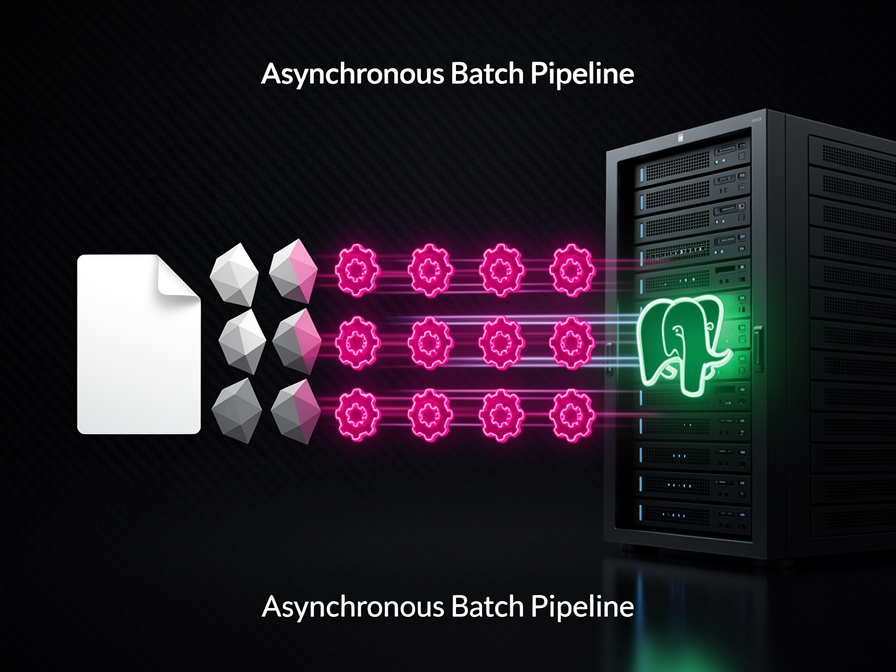
Following the strong engagement on my previous guide to Building AI-Native Apps with Laravel 13 & PostgreSQL, many engineers are moving past local prototypes and scaling their production architectures. However, transitioning from a few hundred rows to millions of vector records introduces a severe infrastructure challenge: Ingestion latency.
If you are building a document search engine or a RAG application, sending raw text strings to an embedding API provider synchronously within an HTTP lifecycle is an anti-pattern. Third-party API roundtrips are highly variable and can easily lock your application threads.
To scale efficiently, you must decouple data ingestion. Let's build a reliable, high-throughput data engineering pipeline using Laravel 13 Bus Batches and the native Laravel AI SDK to process vector data asynchronously.
The Scaling Bottleneck: Why Synchronous Embeddings Fail
When handling large file uploads or massive product catalogs, text must be split into smaller, semantic chunks before vectorization. If a single document produces 200 chunks, making 200 sequential HTTP requests to an embedding provider like OpenAI or Gemini inside a standard controller will trigger severe execution timeouts.
Furthermore, standard PostgreSQL database pools will quickly saturate if connections remain open while waiting for external network I/O. Moving this workload to a dedicated background worker layer ensures your front-end web application remains highly responsive to user traffic.
Step 1: Defining the Batchable Vector Job
We begin by leveraging Laravel's native job batching features. By applying the Batchable trait, this job can run in parallel with hundreds of others while allowing our application to track completion metrics cleanly.
PHP
// app/Jobs/ProcessVectorEmbedding.php
namespace App\Jobs;

use Illuminate\Bus\Batchable;
use Illuminate\Bus\Queueable;
use Illuminate\Contracts\Queue\ShouldQueue;
use Illuminate\Foundation\Bus\Dispatchable;
use Illuminate\Queue\InteractsWithSockets;
use Illuminate\Queue\SerializesModels;
use Illuminate\Support\Facades\Ai;
use App\Models\DocumentChunk;

class ProcessVectorEmbedding implements ShouldQueue
{
    use Batchable, Dispatchable, InteractsWithSockets, Queueable, SerializesModels;

    public function __construct(
        public int $chunkId,
        public string $textContent
    ) {}

    public function handle(): void
    {
        // Fail early if the parent batch has been cancelled by another worker error
        if ($this->batch()?->cancelled()) {
            return;
        }

        // Generate the 1536-dimensional array via the Laravel AI SDK
        $embeddingArray = Ai::embeddings()->create($this->textContent);

        // Update the chunk with the raw vector payload
        $chunk = DocumentChunk::find($this->chunkId);
        if ($chunk) {
            $chunk->update([
                'embedding' => $embeddingArray
            ]);
        }
    }
}
Step 2: Chunking Large Documents and Dispatching the Bus Batch
Next, we write a service layer responsible for breaking down extensive texts into logical semantic parts. Instead of sequential execution, we dispatch these individual jobs inside a unified Bus::batch pool.
PHP
// app/Services/VectorIngestionPipeline.php
namespace App\Services;

use App\Models\Document;
use App\Jobs\ProcessVectorEmbedding;
use Illuminate\Support\Facades\Bus;
use Illuminate\Support\Str;

class VectorIngestionPipeline
{
    public function execute(Document $document): void
    {
        // Simple sentence boundary chunking strategy
        $chunks = Str::of($document->content)->explode('. ');
        $jobs = [];

        foreach ($chunks as $position => $text) {
            if (empty(trim($text))) continue;

            $chunkRecord = $document->chunks()->create([
                'position' => $position,
                'content' => trim($text),
            ]);

            $jobs[] = new ProcessVectorEmbedding($chunkRecord->id, $chunkRecord->content);
        }

        // Dispatch jobs across parallel queue workers
        Bus::batch($jobs)
            ->then(function ($batch) use ($document) {
                $document->update(['status' => 'indexed']);
            })
            ->catch(function ($batch, $e) {
                logger()->error("Vector Ingestion Failed: " . $e->getMessage());
            })
            ->name("Vector-Ingestion-Doc-{$document->id}")
            ->dispatch();
    }
}
Step 3: High-Performance Mass Insertion via Raw PostgreSQL
While Eloquent model updates work well for standard background queues, executing thousands of individual database updates can stress your indexing layer when scaling to massive write operations.
When performance demands it, you can bypass the ORM layer inside your workers and use raw PostgreSQL bindings to upsert vector arrays directly.
PHP
// Alternative high-speed raw SQL update approach for step 1
$vectorString = '[' . implode(',', $embeddingArray) . ']';

\Illuminate\Support\Facades\DB::statement(
    "UPDATE document_chunks SET embedding = ?::vector WHERE id = ?",
    [$vectorString, $this->chunkId]
)
By casting the plain string array explicitly to ?::vector, you minimize data transport bottlenecks and let PostgreSQL map the information directly into your data files.
Production Optimization: Monitoring Memory and Rate Limits
When building high-volume vector ingestion engines, keep these operational considerations in mind:
- RAM Constraints for HNSW Indexes: If you have active HNSW indexes enabled on your vector column, every new write forces the database engine to recalculate graph layers. For large, millions-of-rows batch ingestion pipelines, it is often more efficient to drop your HNSW index entirely, execute your queue batch, and rebuild the index dynamically afterward.
- API Rate Limiting (HTTP 429): Running 50 parallel queue workers can easily exhaust your embedding provider's limits. Utilize Laravel's native job rate limiting middleware or configure an intentional delay within your batch structure to stay within safe provider guidelines.
FAQ: Frequently Asked Questions on Scaling pgvector Ingestion
Q: Can I use Redis instead of Database queues for this pipeline?
Absolutely. For heavy data engineering workloads, switching your queue background connection to Redis (managed via Laravel Horizon) provides significantly higher processing throughput than the traditional database driver.
Q: How do I choose the correct dimension size in my database migrations?
Your dimension size must exactly match the model outputs of your embedding provider. For example, OpenAI's text-embedding-3-small typically yields 1,536 dimensions, whereas smaller open-source alternatives like Voyage or local models might utilize 384 or 1,024 vectors.
Related Articles

Discussion
Leave a comment
Comments are moderated before appearing.
No comments yet — be the first to share your thoughts.