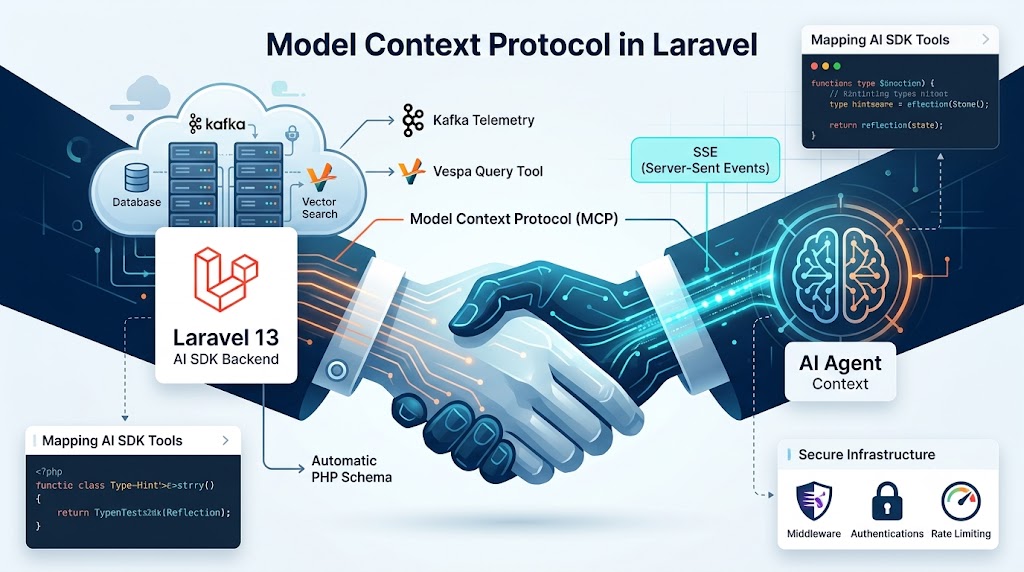
We’ve spent the last year acting as high-paid data couriers, manually feeding database schemas and JSON snippets into LLM chat windows just to get the context right. That’s a massive waste of human cycles. By adopting the Model Context Protocol in Laravel: Building MCP Servers with the AI SDK, we’re finally moving toward a standard where the model can fetch its own context. It turns your Laravel application from a passive container of business logic into a AI agent can browse and execute. It’s essentially the standardized plumbing we need for the "brain" layer of our stack.
Looking at the current MCP documentation, you might think the entire world runs on Node.js or Python notebooks. That’s a big gap to bridge, especially for those of us handling heavy-duty PHP backends and high-scale data pipelines. Most tutorials stop at the 'stdio' transport—which works for a local terminal session—but production applications often require something more flexible. We’re going to explore using Server-Sent Events (SSE) to make our Laravel tools web-accessible, allowing remote LLMs to query our systems securely without the mess of manual exports.
This isn't just about making models seem smarter; it’s about making them functional. We’ll look at mapping Laravel 13 AI SDK tools directly to MCP resources so your agents can tap into live Kafka streams or query vector stores like Vespa without you writing endless amounts of fragile glue code. By the time we’re done, you’ll have a clear path to hardening these interfaces with proper rate limiting, ensuring your AI agents remain an asset rather than a drain on your infrastructure.
The Protocol Pivot: Why Your Laravel App Needs an MCP Server
Let’s be honest: we’ve all spent too many late nights building what essentially amount to glorified pipes. We take a perfectly good Laravel backend, wrap it in a custom JSON-RPC layer, and pray the LLM doesn't hallucinate its way through our brittle API documentation. It’s a lot of overhead for very little magic. But the landscape is shifting. With the rise of the Model Context Protocol in Laravel: Building MCP Servers with the AI SDK, we’re moving away from these custom bridges toward a standardized handshake.
Replacing Custom Integrations with a Unified Schema
Think of MCP as the USB-C of the AI era. Instead of building a unique adapter for every proprietary data source—like that Vespa-backed Semantic Newsletter engine we built last month—we provide a single, unified interface. This protocol allows Claude, or any local agent, to discover what tools and resources your Laravel app offers without you writing a single line of bespoke "glue" code for each model. It’s about making your data legible to the machine. By exposing your internal services as MCP resources, you bridge the gap between your high-scale data pipelines and the user's IDE or agentic workspace. Why keep reinventing the wheel when you can just provide the axle?
The Death of One-Off API Wrappers
We’ve been stuck in a cycle of writing one-off API wrappers that break the moment a schema changes. MCP ends that. By using the AI SDK within the Laravel ecosystem, you can define your tools once and let the protocol handle the heavy lifting. This isn't just about convenience; it’s about stability. When your LLM asks for a customer’s recent purchase history, it shouldn’t have to guess the endpoint or the parameter types. It just calls the tool. Here is how a simple tool definition might look before we wrap it in the MCP transport layer:
// Defining a tool that maps to our Kafka-backed events
use App\Services\EventStore;

$tool = Tool::create('get_user_events')
    ->description('Fetch recent events from Kafka for a specific user.')
    ->parameter('user_id', 'integer', 'The unique ID of the user')
    ->callback(fn (int $user_id) => EventStore::getRecent($user_id));
This approach moves the logic from "how do I talk to the AI" to "how do I expose my data." It treats the LLM as just another client—one that happens to speak a very specific, standardized language. If you're serious about building production-grade AI platforms, you stop building wrappers and start building servers. This transition ensures your Laravel app remains the "source of truth," even when the AI agent is the one doing the heavy lifting.
Mapping Laravel 13 AI SDK Tools to MCP Resources
If you have been playing with the Laravel AI SDK, you already know the routine. You define a Tool class, write a docblock, and hope the LLM understands when to call it. But the Model Context Protocol asks for a bit more than a casual handshake; it demands a formal contract. Think of it as moving from a standard REST endpoint to a full-blown GraphQL schema where the client (the LLM) knows exactly what is on the menu before it even places an order.
Converting Tool Classes to MCP Method Definitions
In the MCP ecosystem, we differentiate between Resources and Tools. A Resource is like a read-only database view—static documentation, logs, or your Kafka schema registry—that the agent can browse. A Tool, however, is a performant action that changes state or queries your "brain" layer, such as running a similarity search in Vespa.ai. Laravel makes this distinction simple by allowing us to bind these classes directly into the service container. When a client like Claude Desktop connects, the MCP server reflects on these bindings to announce its capabilities.
use Illuminate\AI\Tools\Tool;

class VectorSearchTool extends Tool
{
    public string $name = 'search_technical_docs';
    public string $description = 'Search the Vespa.ai index for specific technical documentation.';

    public function handle(string $query, int $limit = 5): array
    {
        // Hits your high-scale vector store
        return [
            'results' => app(VespaClient::class)->search($query, $limit)
        ];
    }
}
Schema-First Development with PHP Type Hinting
The beauty of building this in Laravel 13 is that we don't have to manually write JSON schemas. By leveraging PHP 8.3 type hinting and the SDK’s reflection capabilities, your MCP server automatically generates the inputSchema required by the protocol. This keeps your agent logic "dry" and ensures that if you change a parameter type in your PHP code, the LLM immediately sees the updated requirement in its next session. It’s about building a system that is robust enough to handle the non-deterministic nature of AI without losing the type safety we rely on in the backend. This setup allows your agents to maintain context across sessions, treating the MCP server as a persistent gateway to your data pipelines rather than a one-off script.
Choosing Your Transport: Stdio vs. SSE in a PHP Lifecycle
Once you’ve used those PHP attributes to map your schemas, you hit the plumbing problem. How does the AI actually "hear" your Laravel app? In the MCP world, you generally have two choices: standard input/output (stdio) or Server-Sent Events (SSE). Think of it as the difference between a walkie-talkie and a dedicated fiber line.
The Laravel Zero Approach for Local CLI Tools
Stdio is the default for a reason; it’s dead simple for local work. If you’re building a tool for your own IDE—like Cursor or Claude Desktop running on your machine—a Laravel Zero console command handles this beautifully. The process starts, stays open, and communicates via pipe. But there’s a catch. This approach fails the moment you need to expose your Kafka-backed data pipelines to a remote agent. You can’t exactly pipe a remote shell into a production cluster and call it a day, can you?
Implementing Server-Sent Events (SSE) for Web-Based Agents
For high-scale, distributed agents, SSE is the way forward. PHP’s "shared-nothing" architecture usually wants to die as fast as possible to free up resources. To keep an MCP session alive, we use a StreamedResponse to keep the connection open. This allows the LLM to receive updates as they happen without constant polling.
public function connect(Request $request)
{
    return new StreamedResponse(function () {
        while (true) {
            // Check Redis or a buffer for pending tool calls
            $message = $this->mcpBuffer->pop();
            if ($message) {
                echo "data: " . json_encode($message) . "\n\n";
                ob_flush();
                flush();
            }
            usleep(100000); // Avoid burning CPU cycles
        }
    }, 200, [
        'Content-Type' => 'text/event-stream',
        'Cache-Control' => 'no-cache',
        'Connection' => 'keep-alive',
    ]);
}
Since PHP isn't naturally persistent, you’ll need a stateful bridge—usually Redis—to hold the conversation context between the SSE stream and the POST requests where the LLM actually sends its commands. It’s a bit of a shift from the typical CRUD flow, but it turns your Laravel monolith into a live, reactive brain for any AI agent.
My Experience with PHP Process Lifecycles in SSE
When we first rolled out our SSE endpoint to production during a high-traffic event, we immediately ran into the constraints of PHP’s shared-nothing lifecycle. Keeping a StreamedResponse loop alive meant that single worker processes were tied up for minutes—and sometimes hours—per agent session. Within a short window, our PHP-FPM worker pool completely exhausted itself, causing incoming standard REST requests to queue up and time out.
Furthermore, pulling data directly from a high-throughput Kafka consumer inside that open loop caused memory usage to creep up incrementally due to object caching within the framework. We solved this by strictly decoupling the transport from the ingestion engine: the SSE script does absolutely zero heavy lifting. It sleeps for micro-seconds, wakes up, pokes a lightweight Redis Pub/Sub channel dedicated to that session ID, and flushes the buffer. If an agent goes silent, we aggressively kill the connection after 60 seconds of inactivity to recycle the FPM worker.
Exposing High-Scale Data Pipelines via MCP
Steady streams and persistent connections are the plumbing, but the real value flows from what you choose to expose from your deep-data layer. Once your Laravel app handles the transport, you can start treating your high-scale pipelines as live resources that an LLM can actually reason about. We are moving away from static data snapshots and toward a model where the "brain" layer understands the health and structure of the data it consumes.
Connecting Kafka Ingestion Observability to the LLM
Kafka is often the central nervous system of a modern stack, but it’s typically a black box for AI agents. By wrapping Kafka telemetry in an MCP resource, you allow the model to monitor ingestion health in real-time. If a consumer group starts lagging, the LLM doesn't just see a "data not found" error; it sees the bottleneck in the pipeline. You can even build a tool that lets the model trigger preventative measures or adjust ingestion logic based on current pressure.
class PipelineMonitorTool extends Tool
{
    public string $name = 'get_pipeline_telemetry';

    public function handle(string $topicName): array
    {
        // Accessing the Kafka manager within our Laravel stack
        $stats = Kafka::manager()->getTopicStats($topicName);

        return [
            'lag_count' => $stats->totalLag(),
            'throughput_mb' => $stats->getThroughput(),
            'status' => $stats->isHealthy() ? 'Green' : 'Critical'
        ];
    }
}
Querying pgvector and Vespa through the Protocol
Your vector databases shouldn't be isolated silos that you manually query for every prompt. When you expose pgvector or Vespa.ai via MCP tools, the agent handles its own semantic discovery. It decides when to fetch more context and when to aggregate data from dbt incremental models. This is particularly useful for zero-downtime migrations; the LLM can compare the state of a "shadow" index in Vespa against your production pgvector store to verify consistency before you flip the switch. Instead of manual oversight, the protocol allows the model to act as a sophisticated bridge between your raw event-driven data and the final user response.
Hardening the Interface: Security and Rate Limiting for AI Agents
Once you’ve got that SSE stream humming, the reality of the public internet—or even a messy internal network—sets in. You aren't just shipping tools; you’re managing risk. When an LLM has a direct line to your data pipelines, your MCP server becomes the most attractive target in your stack. We need to lock it down without choking the developer experience.
Middleware for MCP: Authenticating the Model
Since MCP-over-SSE is just another route in your routes/api.php, we treat it with the same respect as our standard REST endpoints. If you’re already using Laravel Sanctum or Passport, don't reinvent the wheel. Wrap your MCP discovery and transport routes in your existing auth middleware. The agent—or the platform hosting the agent—needs a valid bearer token to start the handshake. This keeps random crawlers from poking at your tool definitions or trying to trigger expensive vector lookups.
Route::middleware(['auth:sanctum', 'throttle:mcp-gateway'])
    ->prefix('mcp')
    ->group(function () {
        Route::get('/sse', [McpController::class, 'connect']);
        Route::post('/message', [McpController::class, 'handle']);
    });
Sanitizing LLM Inputs Before Execution
Prompt injection is the new SQL injection. LLMs can be "convinced" to ignore their system prompts and pass malicious arguments to your tools. If your MCP server exposes a tool that interacts with your Kafka stream or runs a pgvector search, you must strictly validate the input schema. Never give an LLM a "delete" tool or a migration command without a human-in-the-loop approval step. For high-stakes operations, I usually implement a confirmation flow where the MCP tool returns a requires_approval status instead of executing immediately. This forces a manual gate before any data is wiped or modified.
Don't forget about resource exhaustion. Vector searches in Vespa or Elasticsearch are computationally expensive. Use Laravel’s RateLimiter to ensure a single chatty agent doesn't spike your CPU or blow through your API credits. I like to set specific limits based on the tool's weight; a simple metadata fetch is cheap, but a semantic search across millions of records gets a much tighter leash.
My Experience with LLM Hallucinations in Deep Vector Queries
I learned the importance of strict type-casting the hard way when we connected an agent to our Vespa.ai semantic search index. The tool expected a clean string $query and a tightly bounded int $limit. During testing, an agent attempted to optimize its own search by injecting raw, structured Boolean logic and specialized filtering syntax directly into the $query string, thinking it was talking straight to a raw SQL engine. The unvalidated string bypassed our basic string length checks and hit Vespa, causing the multi-stage ranking expression to throw a catastrophic query parsing error that temporarily stalled our search gateway.
This prompted a complete rewrite of our validation layer. Now, we treat LLM arguments like untrusted user input at a public firewall. We wrote a custom Laravel validation middleware that sits right before the tool execution handler. It uses regex to strip any hidden execution syntax, forces strict type coercion on numbers, and maps the unstructured query into a strongly typed DTO (Data Transfer Object). If the model passes anything that looks like structured backend query syntax or recursive logic, the middleware rejects the execution entirely and passes a structured error payload back to the agent: "Invalid search format. Provide plain text keywords only." This completely neutralized the hallucination loop.
The Development Loop: Debugging with MCP Inspector
Shipping a fresh MCP server is only half the battle. The real headache starts when an LLM refuses to call your tool or, worse, sends back a cryptic error because your JSON-RPC handshake is slightly off. Debugging these interactions often feels like chasing a ghost in the machine—is the model failing to understand the context, or is your PHP schema just malformed? This is where the MCP Inspector becomes your primary sanity check.
Think of the Inspector as Postman for the protocol. It allows you to poke at your Laravel tools locally without burning through API tokens or waiting for a slow model response. If your PHP type hints haven’t translated correctly into the expected JSON schema, the Inspector will flag it immediately. You can launch it using npx and point it directly at your Artisan command:
npx @modelcontextprotocol/inspector php artisan mcp:serve
While the Inspector handles the schema validation, you still need visibility into the raw traffic. I usually spin up a dedicated log channel in Laravel to capture the back-and-forth. Since MCP often runs over stdio, dumping output directly to the console will break the protocol. Instead, pipe your JSON-RPC payloads to a file to see exactly where the disconnect happens.
// Example of logging the raw protocol message
Log::channel('mcp')->debug('Incoming MCP Request', [
    'method' => $request->getMethod(),
    'params' => $request->getParams(),
]);
Finally, don’t assume your high-scale data pipelines will always respond in milliseconds. If your tool is fetching a fresh embedding from Vespa or waiting on a Kafka offset, latency is inevitable. I like to force-simulate a three-second delay during development to test how the AI agent reacts. Does it retry gracefully, or does it give up and hallucinate a failure? Hardening your retry logic now prevents those "it worked on my machine" tickets when the production database is under heavy load.
Shipping the Protocol-First Stack
Moving from manual API glue to a standardized MCP server changes the relationship between your Laravel backend and the AI. It is no longer about hard-coding every possible user path. Instead, you are building a system that describes itself, allowing LLMs to navigate your Kafka streams and vector stores with actual context. PHP handles this heavy lifting surprisingly well once you get the transport layer right; it is about making your existing data logic legible to the model.
As these agentic workflows become the default, your role shifts from being a bridge builder to an architect of discovery. Keep your tool schemas tight and your validation logic even tighter. The goal isn't just to let the agent see your data—it is to ensure it interacts with that data as reliably as any senior dev would. We are just scratching the surface of what these autonomous interfaces can do when backed by a robust Laravel service container.
Sources & Further Reading
- modelcontextprotocol.io — https://modelcontextprotocol.io/introduction
- github.com — https://github.com/modelcontextprotocol
- laravel.com — https://laravel.com/docs/11.x/artisan
- www.anthropic.com — https://www.anthropic.com/news/model-context-protocol
Frequently Asked Questions
What is the benefit of using the Model Context Protocol in Laravel?
Using the Model Context Protocol in Laravel allows developers to move away from fragile, custom API wrappers toward a standardized handshake. By building MCP servers with the AI SDK, your application becomes a set of discoverable tools and resources that LLMs like Claude can browse and execute. This unified interface simplifies connecting high-scale backends—such as Kafka streams or Vespa vector stores—to agentic workflows without writing bespoke glue code for every model.
Why choose Server-Sent Events (SSE) over stdio for production MCP servers?
While the stdio transport is ideal for local development within a CLI or IDE, it is limited to local pipe communication. Implementing Server-Sent Events (SSE) in Laravel allows your MCP server to be web-accessible, enabling remote AI agents to query your systems securely. SSE maintains an open connection through a StreamedResponse, which is essential for high-scale, distributed agents that need to receive real-time updates and context without the overhead of constant manual polling.
How does the Laravel AI SDK simplify tool definition for MCP?
The Laravel AI SDK leverages PHP 8.3 type hinting and reflection to automatically generate the inputSchema required by the Model Context Protocol. Instead of manually writing complex JSON schemas, you define a standard Tool class with properties and docblocks. This schema-first approach ensures that if you update a parameter type in your PHP code, the LLM immediately recognizes the change, maintaining type safety and reducing hallucinations in non-deterministic AI interactions.
Related Articles
Discussion
Leave a comment
Comments are moderated before appearing.
No comments yet — be the first to share your thoughts.