Following the recent growth of our Asynchronous pgvector Ingestion Guide and Vespa's Real-Time Ingestion Architecture, a recurring question from my enterprise enterprise readers is: "How do we scale ingestion when raw web application events cross tens of thousands of writes per second?"
At that scale, standard web application framework workers and database listeners start showing severe structural strain. If your analytics, feature stores, and search index embedding pipelines are all reading concurrently from your primary database's write-ahead log (WAL) or hitting the tables via heavy poll scripts, your operational application performance will rapidly deteriorate.
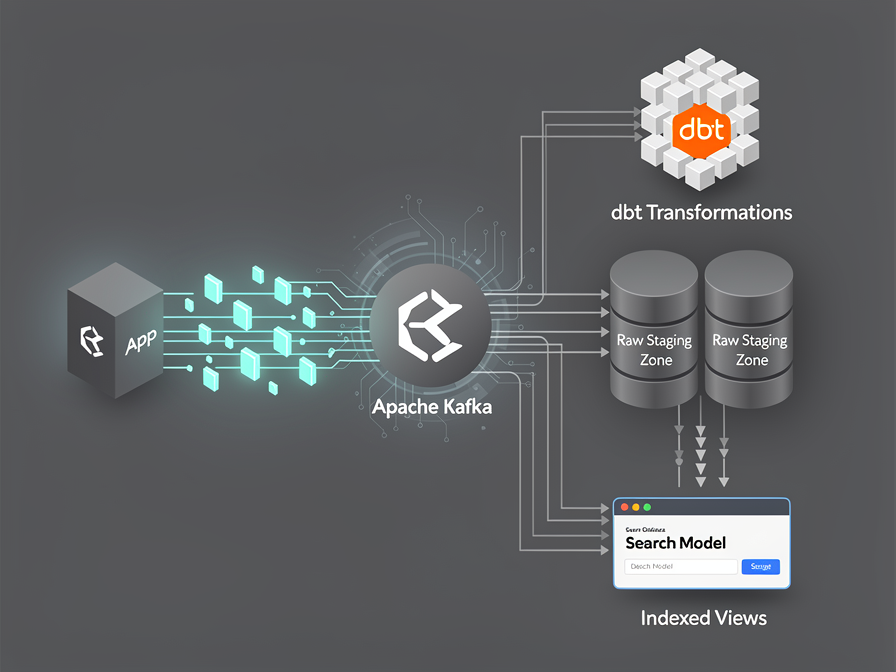
The architecture solution is to shift to an event-driven schema. By decoupling ingestion with Apache Kafka and orchestrating transformations through dbt (Data Build Tool) incremental models, we can move heavy calculation tasks away from our primary systems entirely. Let's look at how to build a high-performance, near-real-time search ingestion data stream.
The Data Highway: Shifting from Application Queues to Event Streams
Traditional app queue systems (like standard background jobs) excel at single, isolated operations—such as sending an onboarding email. However, they struggle with data pipeline use cases because they lack replayability and multi-consumer fanout capabilities.
If three different downstream systems—your Vespa Multi-Stage Search Index, your business intelligence platform, and your personalization layer—all need to react to a single event like ListingUpdated, a traditional queue forces you to dispatch three separate background processes.
Apache Kafka resolves this bottleneck by acting as an immutable, append-only event log. Your application publishes the ListingUpdated packet to a central topic exactly once. Multiple isolated consumer engines can then read from that log independently at their own tempo without creating read contention on your transactional database.
Step 1: Establishing the Kafka Topic with an Immutable Schema Contract
The most destructive pipeline failure occurs when an upstream software developer changes a data field name, silently causing downstream data transformations to crash. To prevent this, every event streaming across our Kafka topics must adhere to a strict, immutable contract enforced via a Schema Registry.
Using Avro notation, our listing_events topic payload contract is structured explicitly:
JSON
{
  "type": "record",
  "name": "ListingUpdated",
  "namespace": "com.architecture.events",
  "fields": [
    { "name": "listing_id", "type": "long" },
    { "name": "title", "type": "string" },
    { "name": "body_content", "type": "string" },
    { "name": "updated_timestamp", "type": "long" }
  ]
}
By configuring our Schema Registry to enforce strict backward compatibility, any changes that omit mandatory fields are instantly rejected at the topic's boundary edge.
Step 2: Streaming Events into Raw Data Warehouse Partitions
To keep our transactional database completely free from analytics workloads, we use a streaming connector (like Kafka Connect or a dedicated consumer) to continuously ingest the raw, unedited JSON payloads from Kafka directly into a "Staging Land" partition inside our data warehouse.
SQL
-- PostgreSQL / Data Warehouse Raw Landing Partition
CREATE TABLE raw_zone.kafka_listing_events (
    id SERIAL PRIMARY KEY,
    payload JSONB,
    ingested_at TIMESTAMP DEFAULT CURRENT_TIMESTAMP
);
At this stage, we follow the core rule of modern Data Engineering: capture everything exactly as it arrived. No cleaning or transformation occurs at the point of entry. The raw tables act as our insurance policy.
Step 3: Writing High-Performance Near Real-Time dbt Incremental Models
Now, we invoke dbt to execute our transformation layers. Instead of running a costly complete table rebuild every hour, we write an Incremental Model using a micro-batch append strategy. This allows dbt to process only the new log records that arrived since the pipeline's previous execution loop.
SQL
{{ config(
    materialized='incremental',
    unique_key='listing_id',
    incremental_strategy='merge'
) }}

WITH raw_events AS (
    SELECT
        (payload->>'listing_id')::BIGINT as listing_id,
        payload->>'title' as title,
        payload->>'body_content' as body_content,
        (payload->>'updated_timestamp')::BIGINT as updated_timestamp,
        ingested_at
    FROM {{ source('raw_zone', 'kafka_listing_events') }}

    {% if is_incremental() %}
        -- Only fetch rows newer than the max updated timestamp currently in the target model
        WHERE ingested_at > (SELECT MAX(ingested_at) FROM {{ this }})
    {% endif %}
)

SELECT
    listing_id,
    title,
    body_content,
    updated_timestamp,
    ingested_at
FROM raw_events
By scheduling this dbt step to execute on a continuous tight interval (e.g., every 5 minutes), your staging warehouse models remain incredibly fresh. Downstream background workers can then monitor this clean table view to generate vector embeddings effortlessly, completely isolated from your main user-facing application loop.
Data Engineering Guardrails: Mitigating Write Amplification
As a Solution Architect, I must issue a warning regarding high-frequency dbt runs: watch your data compute budgets closely. If your staging models invoke heavy calculations or unindexed table scans every 5 minutes, you can easily trigger Write Amplification, driving up cloud infrastructure overhead.
To keep your pipeline cost-efficient, always verify that your incremental filtering parameters are properly aligned with indexed timestamps. If your downstream consumer requires sub-second data freshness instead of a 5-minute micro-batch window, bypass data warehouse transformations entirely and route your Kafka events straight to an engine like Vespa using dedicated real-time streaming tools.
FAQ: Frequently Asked Questions on Kafka-to-dbt Architectures
Q: Can I use Laravel background queues to push directly to Kafka?
Yes. You can configure an asynchronous background worker inside your application logic to buffer outgoing events and batch-write them to your Kafka brokers using a low-overhead client extension. This keeps your web application's user-facing response times well within the single-digit millisecond range.
Q: How do we recover data if a downstream dbt transformation crashes?
Because Kafka stores log events persistently for a customizable retention period (e.g., 7 days), data is completely replayable. If a transformation error slips into your production models, you can safely deploy a fix, reset your dbt incremental data snapshots, and reprocess the raw event history from any point in the log.
Related Articles
Discussion
Leave a comment
Comments are moderated before appearing.
No comments yet — be the first to share your thoughts.