If you’ve been following my deep dive into Vespa.ai vs. Elasticsearch, you know that Vespa is the heavyweight champion of "big data" search. But as we move further into 2026, a new challenge has emerged: The Economics of Private Search.
As a Senior Solution Architect, I'm seeing teams struggle with a massive cost bottleneck. When you build an app where users search their own private data—think personal notes, private emails, or localized service history—traditional indexing becomes a financial liability.
The solution isn't a bigger cluster; it's a smarter architecture. It’s time to talk about Vespa Streaming Mode.
The Multi-Tenancy Trap: Why Global Indexes Explode Your Budget
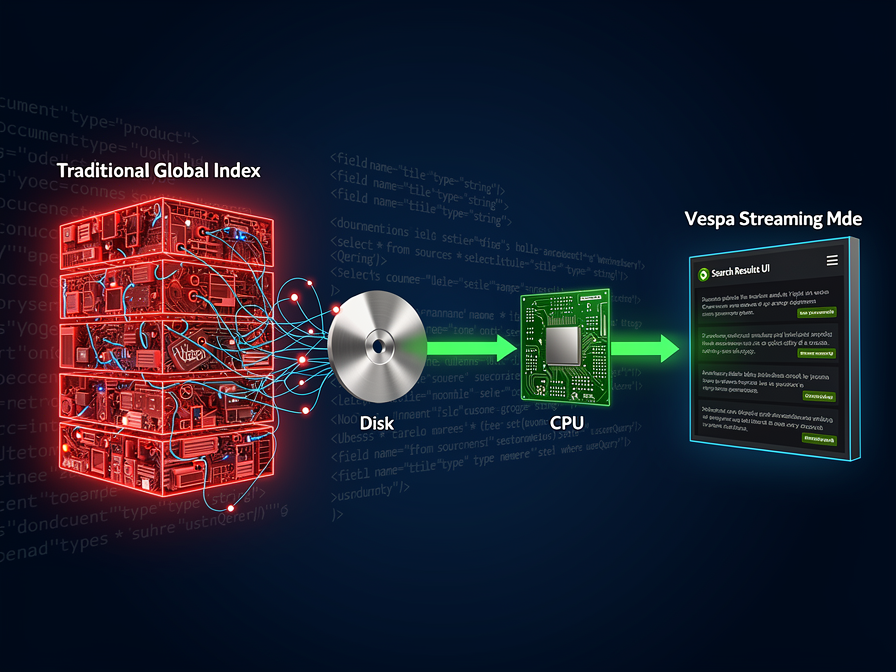
Traditional search engines work by building a "Global Inverse Index." They take every word from every user, mash them together, and keep them "warm" in memory so you can search across the entire dataset in milliseconds.
This is great if you are building a public marketplace. But if you have 10 million users who only ever search their own data, you are paying to maintain a massive global index that no one actually uses globally. You are essentially paying for "warm" memory for data that stays cold 99% of the time.
What is Vespa Streaming Mode? (Search Without the Index)
Vespa Streaming Mode flips the script. Instead of a global index, it organizes data by a "group-id" (like a user_id).
When a user performs a search, Vespa doesn't look at a global index. Instead, it streams only that user's data from disk into the CPU, performs the ranking and filtering on the fly, and returns the result.
The result? You eliminate the memory overhead of the inverted index entirely. You can store 10x to 100x more data on the same hardware because you aren't fighting for RAM to store index structures.
The Economics of Search: When to Stream vs. When to Index
In 2026, the "best" architect isn't the one who uses the fastest tool, but the one who uses the most cost-effective one for the job.
| Feature | Indexed Mode | Streaming Mode |
| Query Latency | Ultra-Low (Milliseconds) | Low (Tens of Milliseconds) |
| Data Volume | Medium | Massive / Unlimited |
| Cost per GB | High (RAM Intensive) | Ultra-Low (Disk Intensive) |
| Use Case | Public Search / Global Discovery | Private Data / Multi-Tenancy |
Implementing Streaming Mode in 2026
Transitioning to Streaming Mode requires a shift in how you define your search schema. In your services.xml, you simply define the content cluster with mode="streaming".
The key for Data Engineering teams is ensuring your document-id contains the user_id or tenant_id. This allows Vespa to find the data shard instantly without a global lookup.
The Configuration: Switching to Streaming Mode
In a standard Vespa setup, your services.xml defaults to indexed mode. To unlock the cost-savings of Streaming Mode, you need to explicitly define it at the content cluster level. This tells Vespa to skip the memory-heavy inverted index creation.
XML
<!-- services.xml -->
<content id="private_data_cluster" version="1.0">
    <documents>
        <!-- The mode="streaming" is where the magic happens -->
        <document type="user_document" mode="streaming" />
    </documents>
    <nodes>
        <node hostalias="node1" distribution-key="0" />
    </nodes>
</content>
The Schema: Grouping Data for Efficiency
For Streaming Mode to be performant, Vespa needs to know how to "find" the user's silo on the disk without scanning the whole drive. This is done by defining a summary field that acts as the partition key.
In your schema file (user_document.sd), you should mark your user_id (or tenant_id) as a attribute that is used for grouping.
Code snippet
# user_document.sd
schema user_document {
    document user_document {
        field user_id type string {
            indexing: attribute | summary
            attribute: fast-search
        }
        field title type string {
            indexing: summary | index
        }
        field body type string {
            indexing: summary | index
        }
    }
}
Querying the Stream: The YQL Advantage
When querying in Streaming Mode, the query must include the streaming.groupname parameter. This ensures that Vespa only touches the data shards relevant to that specific user, keeping the latency low (usually <50ms) even though there is no global index.
Using YQL (Yahoo Query Language), your request would look like this:
HTTP
# The API Request
GET /search/?yql=select * from user_document where title contains "architecture"
     &streaming.groupname=user_12345
     &hits=10
By providing the streaming.groupname, you are essentially telling the CPU: "Ignore the billions of other documents; only stream the 5,000 documents belonging to user_12345."
Related Articles

Discussion
Leave a comment
Comments are moderated before appearing.
No comments yet — be the first to share your thoughts.